Roop丨一文教你学会用Stable Diffusion插件换脸
发布时间:2023-12-20
嗨,恭喜你发现了宝藏!
在这个教程中,我们将探索如何创造出惊人的逼真图像。
Roop 是一个强大的工具,允许您无缝地交换面孔并获得逼真的效果。
无论您是艺术家、内容创作者,还是仅仅想要体验图像操作的乐趣,这份指南都将为您提供下载和使用 stable diffusion 中的 Roop 扩展的步骤。
更多信息请访问Roop的Github页面:
https://github.com/s0md3v/sd-webui-roop
使用 Roop 进行换脸的要求
请按照以下要求进行操作:
在 Windows 上,下载并安装Visual Studio。安装过程中,请确保包含了 Python 和 C++ 包。
在 stable-diffusion-webui目录下打开命令提示符,运行以下命令:pip install insightface==0.7.3

打开 Stable Diffusion WebUI 并进入网络界面的“扩展Extensions”标签。
在“从 URL 安装”标签中,粘贴以下 URL:
https://github.com/s0md3v/sd-webui-roop

安装完成后,关闭 Stable Diffusion webui。
下载 inswapper_128.onnx 模型:
https://huggingface.co/ezioruan/inswapper_128.onnx/tree/main将下载的 inswapper_128.onnx 模型替换到 <webui_dir>/models/roop/ 目录中。
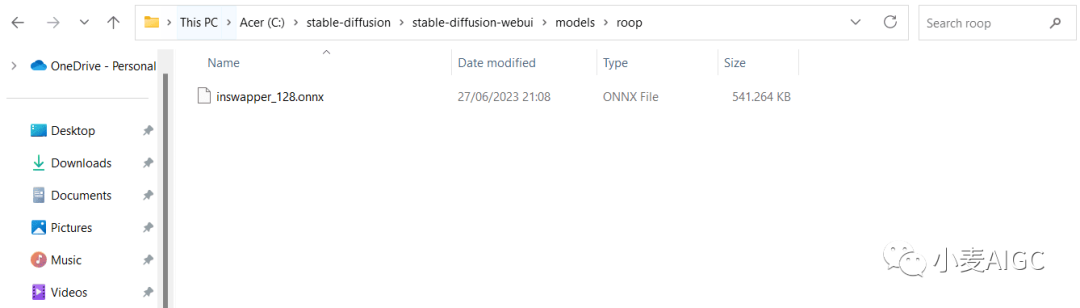
通过双击 webui-user.bat 文件启动 Stable Diffusion。
一旦 Stable Diffusion 打开,您应该能在“txt2img”和“img2img”标签下看到 roop 扩展面板。
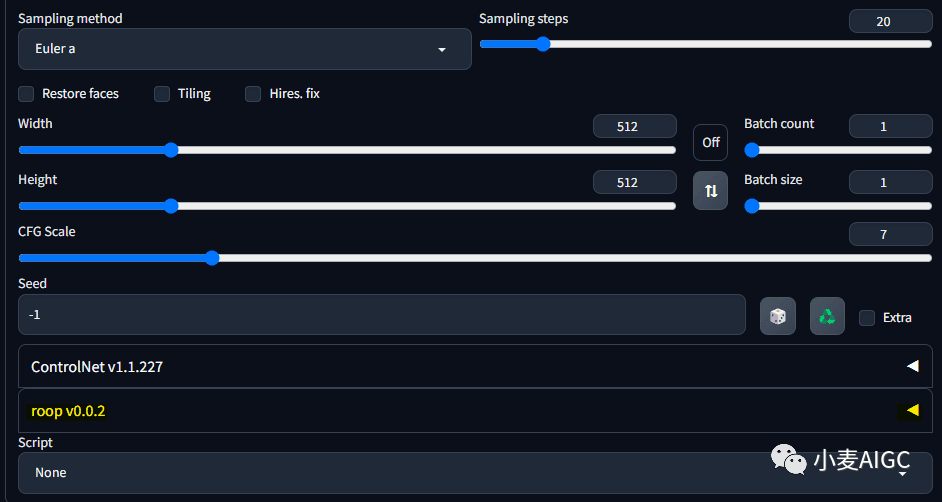
使用 Roop 进行换脸
Roop 采用两步过程进行换脸。
首先,AI 图像被完全渲染出来,然后将 roop 图像中的脸部应用到创建的 AI 图像上。
这一区别在渲染过程中变得明显,其中图像看起来已完成,但由于脸部应用的过程较长,所以需要更长的时间。
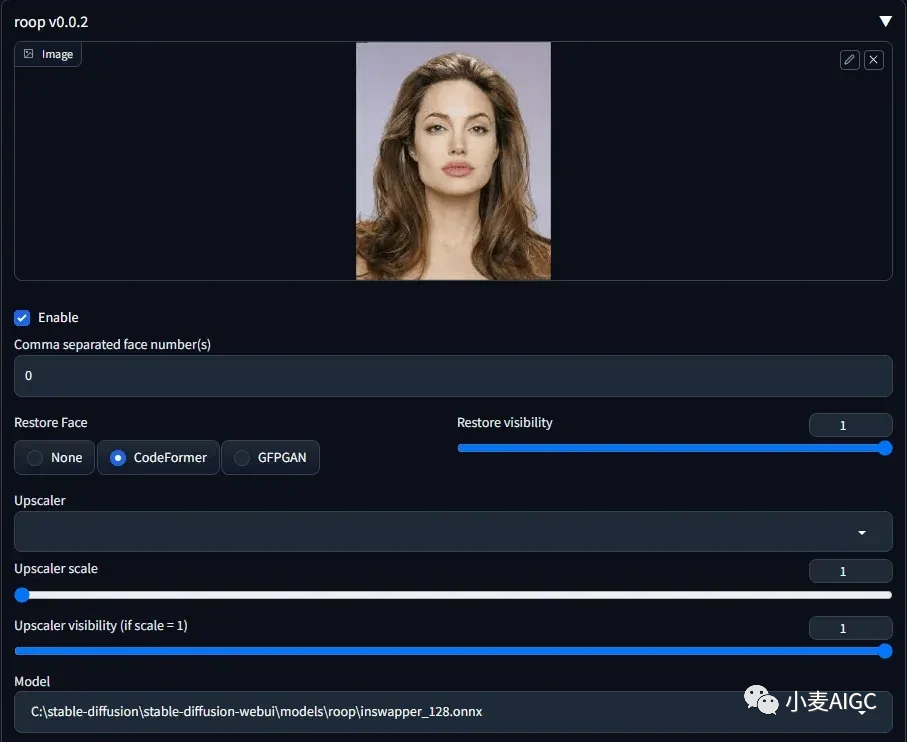
将图像拖入 Roop 扩展面板
选中复选框Enable以“启用”Roop。
从恢复脸部(Restore Face)选项中点击“CodeFormer”。
创建正面和负面提示。
点击“生成”。
最终结果是创建一个类似于安吉丽娜·朱莉的惊艳面孔,使用您自己的输入提示生成。

使用 Roop 的技巧与注意事项
为了获得最佳效果,使用 Roop 时有几点需要考虑:
确保照片中的脸部不被头发或配饰等物体遮挡。
勾选“恢复面孔”框。

面孔没有被换掉?您点击了“启用”吗?如果您点击了,且命令提示符控制台没有显示任何错误,这意味着 Roop 检测到您的图像要么是 NSFW,要么根本无法检测到面孔。
换脸示例
在这一部分,我们将展示一系列引人入胜且令人印象深刻的 Stable Diffusion 换脸演示,突显这项创新技术的非凡能力。准备好惊叹于 Stable Diffusion Roop 扩展所实现的无缝变换。为一场与众不同的非凡视觉体验做好准备。
示例一(安吉丽娜朱莉):


正面提示:
perfect hand, ultra detailed, 8k, raw photo, beautiful light, perfect shadows, (face portrait:1.5), (face portrait of a young mature women:1.3), (traditional white dress:1.2), (white dress:1.2), (silk white dress:1.3), white dress with golden jewelry, red jewelries, (cleavage:1.3), long dark hair, (green eyes:1.2), big lips, red lips, burning man desert, (wearing designer hat:1.1), (desert background:1.2), burning man festival background, shim light, tight body, dynamic angle, sexy look, natural skin, posing负面提示:
(worst quality:1.2), (low quality:1.2), (lowres:1.1), (monochrome:1.1), (greyscale), multiple views, comic, sketch, (((bad anatomy))), (((deformed))), (((disfigured))), watermark, multiple_views, mutation hands, mutation fingers, extra fingers, missing fingers, watermark,采样步数: 50
采样器: DPM++ 2M Karras
提示词相关性(CFG scale): 7
尺寸 704x392
模型: cyberrealistic
Clip跳过: 2
示例二(赞达亚):
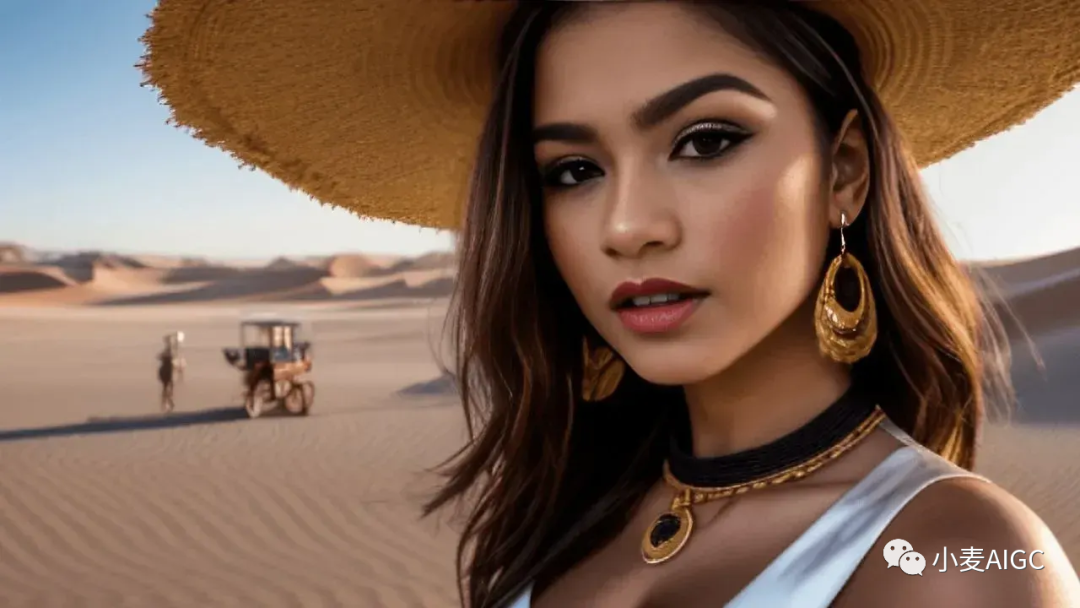
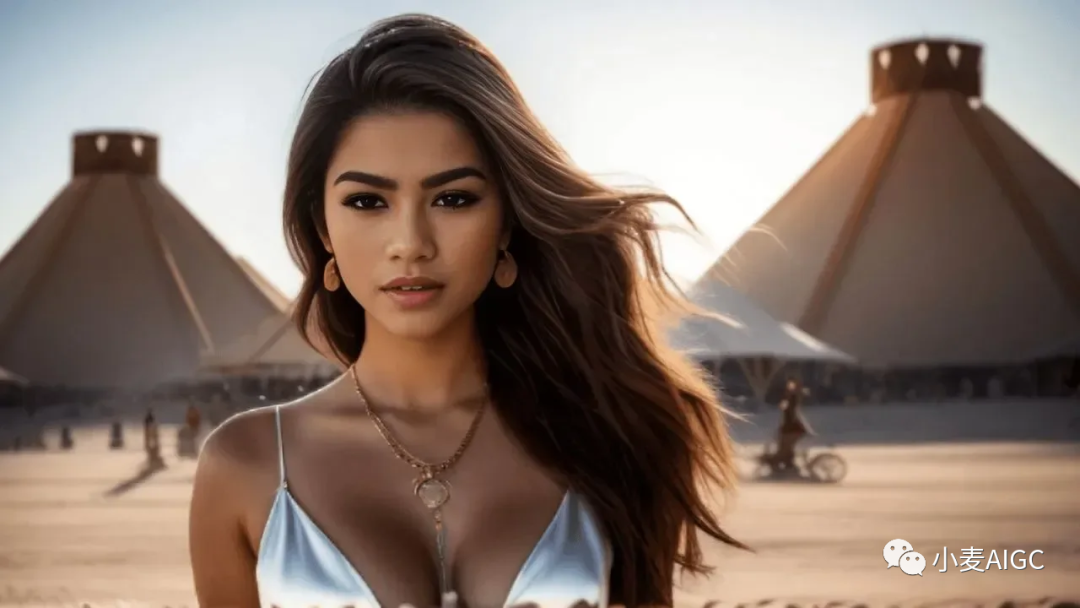
正面提示:
perfect hand, ultra detailed, 8k, raw photo, beautiful light, perfect shadows, (face portrait:1.5), (face portrait of a young latina women:1.3), (silk white dress:1.3), jewelry, (cleavage:1.3), black hair, burning man desert, (desert background:1.2), burning man festival background, shim light, dynamic angle, sexy look, natural skin, posing
负面提示:
(worst quality:1.2), (low quality:1.2), (lowres:1.1), (monochrome:1.1), (greyscale), multiple views, comic, sketch, (((bad anatomy))), (((deformed))), (((disfigured))), watermark, multiple_views, mutation hands, mutation fingers, extra fingers, missing fingers, watermark
采样步数: 50
采样器: DPM++ 2M Karras
提示词相关性(CFG scale): 7
尺寸: 704x392
模型: cyberrealistic
Clip跳过: 2
示例三(艾玛斯通):


正面提示:
perfect hand, ultra detailed, 8k, raw photo, beautiful light, perfect shadows, (face portrait:1.5), (face portrait of a young white women:1.3), (white dress:1.2), (silk white dress:1.3), jewelry, (cleavage:1.3), (red hair:1.3), (green eyes:1.5), (looking straight into the camera:1.2), burning man desert, (desert background:1.2), burning man festival background, shim light, dynamic angle, sexy look, natural skin, posing
负面提示:
(worst quality:1.2), (low quality:1.2), (lowres:1.1), (monochrome:1.1), (greyscale), multiple views, comic, sketch, (((bad anatomy))), (((deformed))), (((disfigured))), watermark, multiple_views, mutation hands, mutation fingers, extra fingers, missing fingers, watermark
采样步数: 50
采样器: DPM++ 2M Karras
提示词相关性(CFG scale): 7
尺寸: 704x392
模型: cyberrealistic
Clip跳过: 2
恭喜您学会了如何在 stable diffusion 中使用 Roop 扩展进行换脸。
按照本教程中概述的步骤和注意事项,您可以创建出令人惊叹的逼真换脸效果。
想了解更多资讯,欢迎前往ChatDZQ官网!www.chatdzq.com
相关文章

扫码在手机访问
随时随地
掌握经营技巧
专业顾问
为您解决经营难题
立即咨询
咨询热线
400-8856-200